Audio and instant text.
Sensory Scribe® for Mac.
Real-time transcription with colour-coded markers and synchronised playback of recorded audio. No internet required. 100% Private.
Capture spoken words with precision
Real-Time Transcription
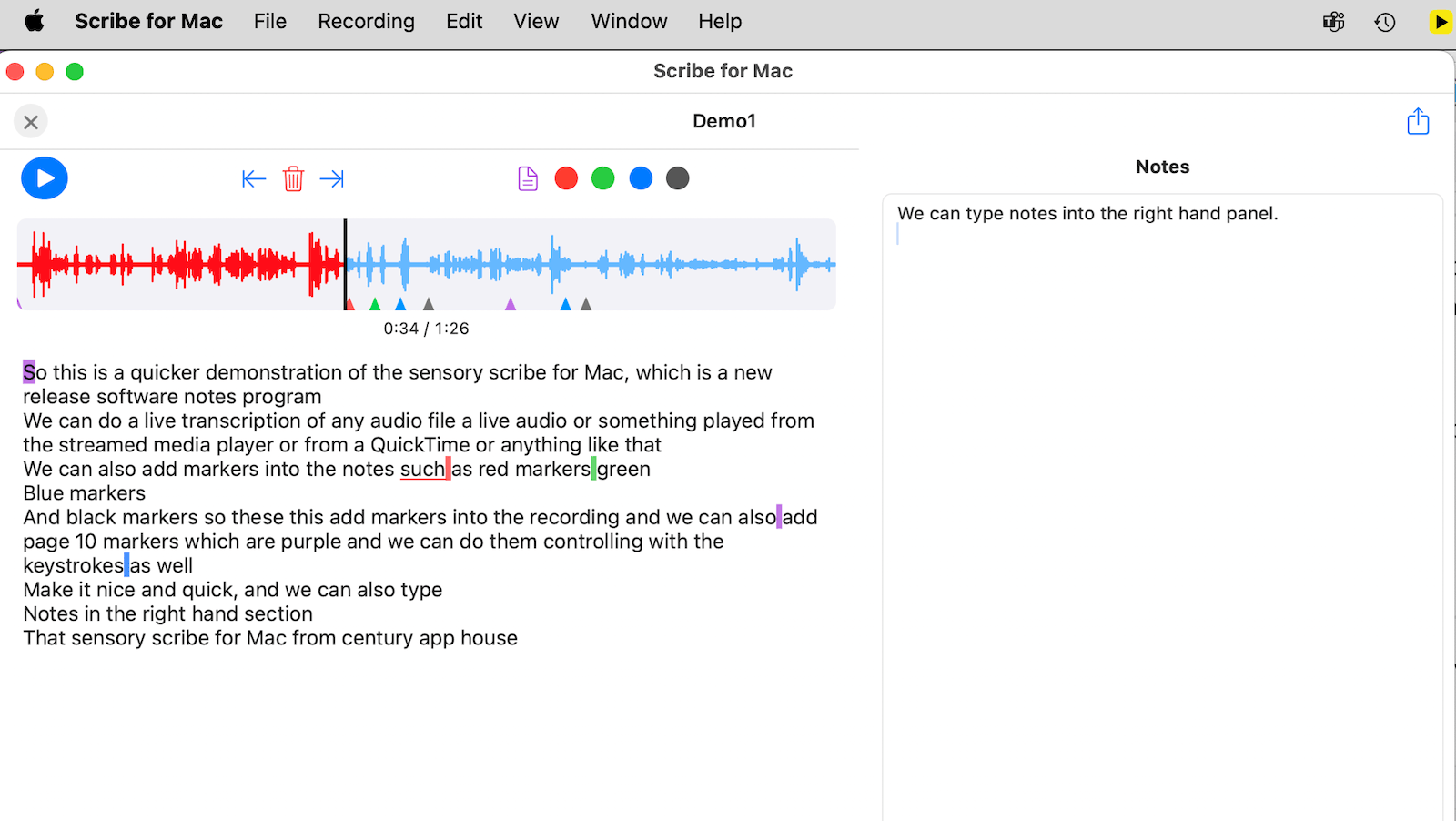
Watch your words appear instantly as you speak. Using the Mac Neural Engine, Scribe provides fast, accurate text without sending data to the cloud.
Synchronised Playback
Review any recording with a visual waveform. Individual words highlight in sync with the audio for quick navigation.
Colour-Coded Markers
Tag important moments as they happen. Five distinct marker types let you flag decisions, topic changes, or action items.
Keyboard-First Design
A full set of keyboard shortcuts for recording, markers, and file management means you never have to break your flow.
Finder Integration
Audio recordings, transcription and notes files save to your Documents folder as self-contained directories. Manage them natively in Finder.
Share as ZIP
Export complete recordings as ZIP archives containing audio, transcript, word timing, and marker data for easy sharing.
Simple workflow
Record
Press ⌘R to start. Watch your transcript build in real time.
Annotate
Drop markers at key moments and add text notes.
Review
Play back with synchronised highlighting and waveform.
Share
Export as a ZIP archive with all data bundled together.
Your data stays in your hands
Sensory Scribe saves every recording as a self-contained folder in your Documents. Browse them just like any other file on your Mac.
Mark what matters. Find it instantly.
Page
Section breaks
⌘⇧PRed
Critical points
⌘⇧1Green
Action items
⌘⇧2Blue
Questions
⌘⇧3Black
General notes
⌘⇧4Built for the keyboard
Built for everyone
Professionals
Record meetings and mark action items instantly.
Students
Capture lectures and flag questions for later study.
Journalists
Transcribe interviews with searchable timestamped notes.
Researchers
Document field notes privately and without internet.
Sensory Scribe for Mac Overview video